💻 Personal website for Developers

A personal website that ships before your résumé does

Recruiters and hiring managers Google you before the phone screen. A clean personal site puts your projects, GitHub and stack one link away — no PDF to open, no login wall.

Claim your name: digitalcvmaker.com/

● Live in 5 minutes · free to start · no auto-renew · हिंदी में पढ़ें

See it live

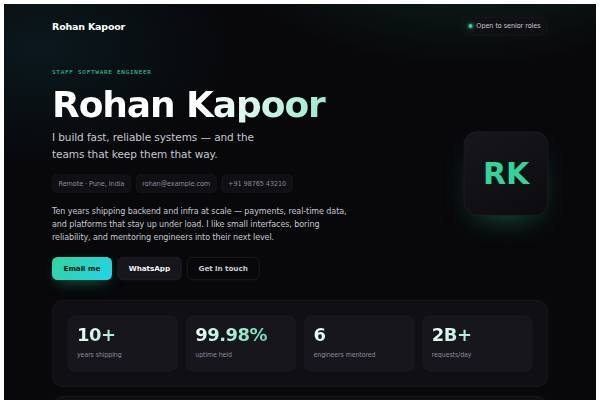
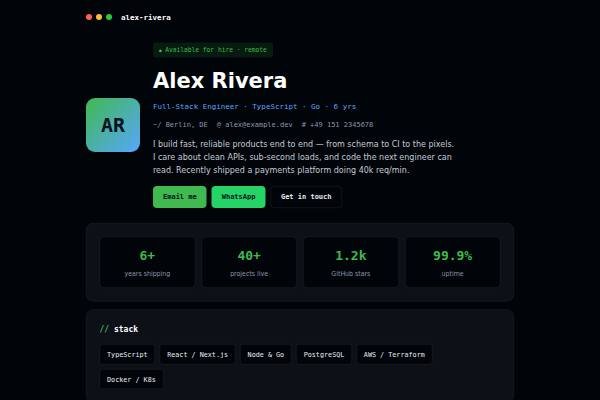
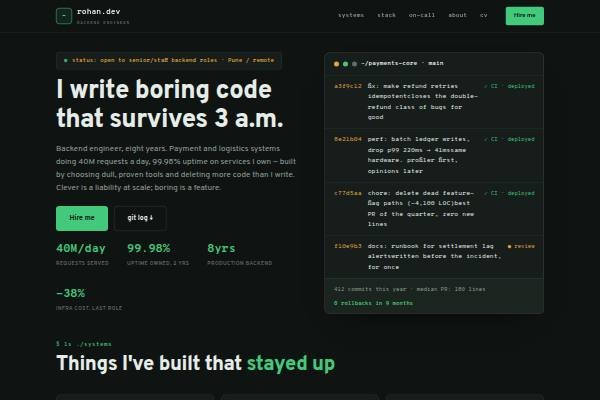
See a live demo of a developer website

Real designs filled in for a sample person (not a real profile). Open one, scroll it like a visitor would, then make yours free.

Before and after

Same person, same details — as a PDF and as a website.

Before: the resume Sample developer resume, page 1 of the PDF
Page 1 of the PDF
After: the website
The live demo website · Open it →

Does a developer need a personal website?

Yes — a developer benefits from a personal website, especially when switching jobs or taking side contracts. It lets a hiring manager open working code, read how you solved a real problem and see your stack in one place, which a keyword-heavy résumé on a job portal cannot show.

Why Developers choose a personal site

Everything a developer needs, in one link

Show, don’t list

Link live demos and repos next to each project so people can click through, not just read bullet points.

Own your handle

yourname.com beats a buried LinkedIn URL on a business card, in a bio, or at the top of a cold email.

Always current

Update a shipped project in seconds — no re-exporting a PDF and re-uploading it to ten job boards.

Before you publish

What to put on your developer website

Tick off each item as you add it — and why each one matters to the people who read your site.

Page outline

How to lay out a developer website

  1. One-line positioning Say what you build and at what level, for example “backend engineer, payments and high-traffic APIs, five years”, so a recruiter knows within seconds which roles fit you.
  2. Three deep project write-ups For each project cover the problem, the architecture you chose, one trade-off you made and what you would change now. Link the repository and a live demo where possible.
  3. Stack with honest depth Split tools into “use daily”, “have shipped with” and “exploring”. Interviewers probe what you list, so an honest split saves you awkward moments in technical rounds.
  4. Work history with impact List each employer’s domain, team size and what you owned, such as a migration, an on-call rotation or a module, rather than copying the job description.
  5. Writing and talks Short technical notes, meetup talks or debugging stories show how you think and communicate, which matters for senior roles and remote teams.
  6. Contact and availability State notice period, preferred locations or remote, and whether you take freelance work. Add email and a LinkedIn link; keep your phone number off the public page.
Templates

Website templates for developers

What developers in India should know before going online

There is no licensing body for software developers in India, so trust is built through visible work. Most hiring still starts on Naukri and LinkedIn, where recruiters filter by keywords, notice period and current CTC; your website is what they open after the shortlist. Service companies, product startups and global capability centres screen differently, so tailor the first project you show. Mention your notice period plainly, since recruiters here ask about it early and it can decide a shortlist. If you have signed an NDA or your employer owns the code, describe the system and your role without sharing proprietary code or client names. Developers in Bengaluru, Hyderabad, Pune, Chennai and the NCR compete in crowded markets, so a clear niche helps more than a long skills list.

Common website mistakes developers make

  • Listing twenty technologies with equal weight. Group them by real depth and remove anything you could not discuss comfortably for ten minutes in an interview.
  • Linking tutorial clones such as to-do apps as flagship work. Replace them with one project that solved a real problem, even a small internal tool, and explain the decisions.
  • Leaving demo links that no longer load after a free hosting tier expired. Check every link each quarter and replace broken demos with screenshots or a short screen recording.
  • Writing project descriptions only as feature lists. Add the problem, constraints, your specific contribution in a team and one measurable change, such as faster page loads or fewer support tickets.
  • Hiding the contact route at the bottom of a long page. Put email and availability in the header and repeat them after the projects section, where interest is highest.
How it works

From nothing to a live site in three steps

1

Pick a template

Start from a design built for professionals like you.

2

Make it yours

Add your details, work and photo — no code, no designer.

3

Go live and share

Publish to your own link and put it everywhere that matters.

Plans from Rs.499 a month · See plans

One place for your job

Everything for developers

FAQ

Questions from Developers

No. You pick a template and fill in your projects, stack and links through a simple editor. It’s ideal when you’d rather spend your evenings on side projects than on tweaking CSS for your own portfolio.

Yes. Each project can carry links to its repository, a live demo and a short write-up of what you built, the stack you used and the problem it solved, so reviewers can click straight through.

It gives recruiters one link that shows real work, which is harder to fake than a keyword list. Pair it with your Naukri or LinkedIn profile and add the URL to every application you send.

Yes, custom domains can be connected on paid plans. On the free plan your site gets a shareable link on our host; the link with your name in it comes with paid plans.

GitHub shows code, but not context. A portfolio site lets you explain what each project does, your role in it and the result, then link to the repo for anyone who wants to read the code. Many developers keep both.

Three to five well-explained projects usually work better than a long list. Pick ones that match the jobs you are applying for, and remove tutorial clones once you have original work to show.

Made for you

Personal websites for every profession

All professions →

Your name, your site, your callback

Join the Developers who let their own site do the talking.

● Live in 5 minutes · free to start · no auto-renew

Chat on WhatsApp