🎨 Tech & Digital

Terminal website template

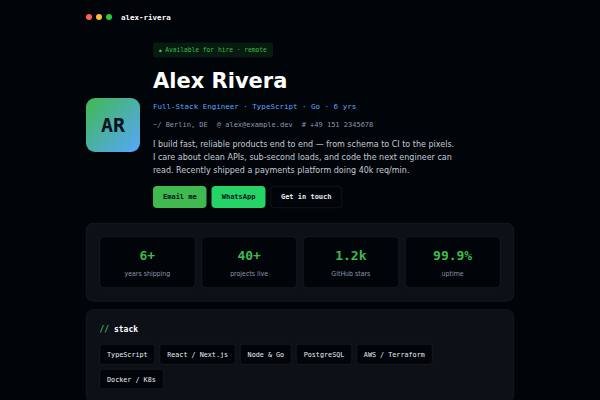
Dark, code-inspired developer profile: impact stats, tech stack, experience timeline, education, endorsements and a hire-me contact.

● Free to start · switch designs any time

Terminal personal website template for developers, software engineers — home page preview

About the Terminal design

Terminal is a dark, code-flavoured profile for software engineers. The background is near-black with GitHub-style green and blue accents, set in Space Grotesk and JetBrains Mono, and section headings are lowercase like command names. The hero shows your availability, name, role, stack, location and contact, then a short description of what you build. Below come impact stats, a tech stack as chips, an experience timeline with measurable results, education and certifications, endorsements from colleagues and a hire-me contact.

Design highlights

  • Near-black theme with green and blue accents familiar to developers
  • Lowercase, command-style section headings in JetBrains Mono
  • Experience entries built for results like latency cut or features shipped
  • Small, fast page without heavy scripts

Who it suits

What’s included

Sections in the Terminal template

Plus your intro, photo and contact details. Switch any section off, fill the rest in minutes.

FAQ

About the Terminal template

Terminal suits backend, DevOps and full-stack engineers who like a dark, code-style look. Horizon is light and product-focused, which fits product designers, PMs and front-end engineers. Both have stats, skills, experience, education and testimonials, so your content moves across if you switch.

Add the links in your experience or contact text, and put your GitHub stars or contributions in the impact stats if they are meaningful. Recruiters will click through, so make sure pinned repositories have readable READMEs. A short line on what each project does helps non-technical recruiters too.

Yes. Create a free account, pick Terminal and publish your site at your own link. Paid plans remove the small “Made with” badge and let you connect a custom domain.

Terminal comes with: Impact stats, Tech stack, Experience, Education & certifications, Endorsements, Contact — plus your intro and contact details. Every optional section can be switched off, and you can reorder your content as you edit.

Yes. Your details are saved separately from the design, so switching templates keeps your content — only the look changes.

Yes. Pick your own accent colour and font in the editor; the layout adjusts automatically and stays readable on phones.

Make Terminal yours

Add your details and publish in about five minutes.

● Live in 5 minutes · free to start · no auto-renew

Chat on WhatsApp