🎨 Tech & Digital

Syntax website template

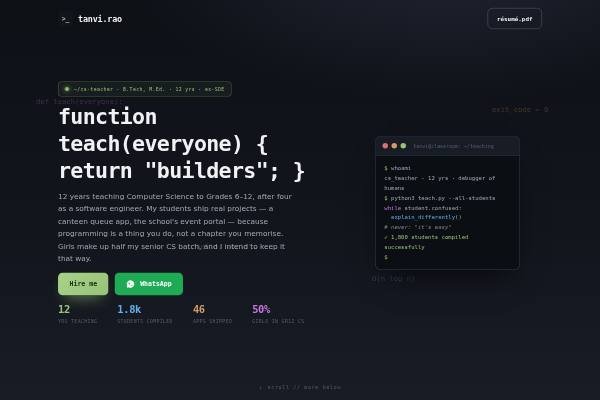
Editor-dark page for computer-science teachers & developers: terminal hero, README card, the stack (skills), how I build (method), track record, education & certifications, releases, posts, testimonials, hiring brief and contact.

● Free to start · switch designs any time

Syntax personal website template for developers, students — home page preview

About the Syntax design

Syntax is styled like a code editor for computer science teachers and developers. The hero is an IDE-dark panel with a blinking caret and floating code tokens, and headings are written as code: “function teach(everyone)”, “git log --twelve-years”, “stdout >> thoughts.log”. The body is off-white, with syntax-highlight colours as accents: purple keywords, blue functions, green strings, orange numbers and red errors. JetBrains Mono sets headings and labels, Karla the body. Sections include a README card, pinned dependencies, debugging as curriculum, releases, posts, approved testimonials and an open-pull-request hiring brief.

Design highlights

  • Section headings are written as code, like git log commands and function calls.
  • Syntax-highlight colours from code editors are reused as the page palette.
  • A README card introduces you in the format developers read every day.
  • Testimonials are labelled “Approved without changes”, like a merged pull request.

Who it suits

What’s included

Sections in the Syntax template

Plus your intro, photo and contact details. Switch any section off, fill the rest in minutes.

FAQ

About the Syntax template

Each code heading has a plain-language line beside it, so principals and parents still follow the page. Developers and students enjoy the jokes, and they signal that you are comfortable with real tools. If your audience is mainly parents, you can soften headings in the editor.

Yes. Computer science students can use the README for a short bio, dependencies for languages, releases for projects and posts for write-ups or hackathon notes. Rename the hiring brief to internships you are looking for, and link each release to its repository or live demo so reviewers can try your work.

Yes. Create a free account, pick Syntax and publish your site at your own link. Paid plans remove the small “Made with” badge and let you connect a custom domain.

Syntax comes with: Awards, Notes / blog, Testimonials — plus your intro and contact details. Every optional section can be switched off, and you can reorder your content as you edit.

Yes. Your details are saved separately from the design, so switching templates keeps your content — only the look changes.

Yes. Pick your own accent colour and font in the editor; the layout adjusts automatically and stays readable on phones.

Make Syntax yours

Add your details and publish in about five minutes.

● Live in 5 minutes · free to start · no auto-renew

Chat on WhatsApp