When you need a PDF page as an image
Many application forms accept only JPG uploads for documents such as a caste certificate, mark sheet or experience letter, even when your copy is a PDF. Images are also easier to share on WhatsApp, where a PDF opens as a file but a JPG shows up right in the chat, and to paste into a presentation or a Word document.
Getting a clear, accepted image
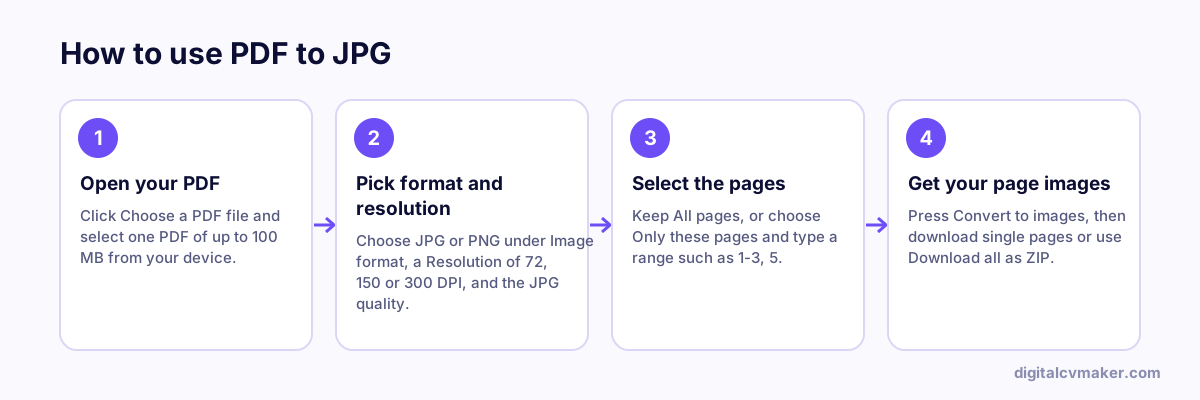
- Convert only the page the form asks for, using a range like 2 or 1-2.
- Start with JPG at 150 DPI. If small print looks soft, convert again at 300 DPI.
- Check the form’s size limit. If the image is too heavy, lower the JPG quality or resize it with the photo resizer.
- Open the image on your phone and zoom in on names, dates and numbers before you submit.
Images do not keep selectable text. For a resume sent to a recruiter or uploaded to a job portal, send the PDF itself so ATS software can read it.
Related tools
- Fit an image into a KB limit with Photo Resizer.
- Going the other way? Use Images to PDF.
- Pull pages out as a PDF instead with Split PDF, or browse all free tools.