🖼️ Free tool · no signup

Free Photo Resizer

Resize and crop a photo to passport size, stamp size, a signature size or any pixel size, and bring it under a KB limit — free, in your browser. Sizes differ by country: an Indian passport photo is 35 × 45 mm, while a US passport photo is 2 × 2 inches.

Photo and signature rules differ between forms, exams and offices. Always check the official notice for the exact pixel size, KB range, background and format before you upload.

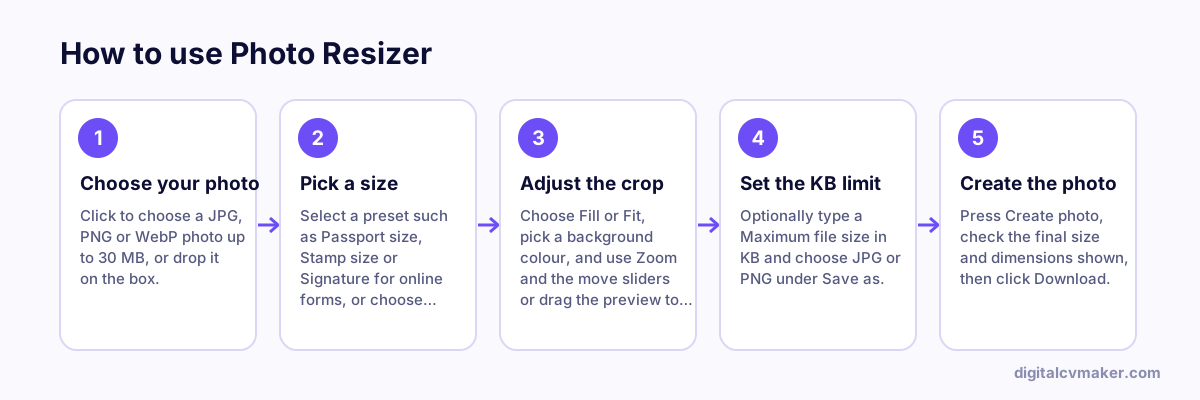
How to use Photo Resizer: 1. Choose your photo, 2. Pick a size, 3. Adjust the crop, 4. Set the KB limit, 5. Create the photo.
How to use the Photo Resizer, step by step.

How to resize a photo for an online form

  1. Read the notice of the form first. Note the width and height (in pixels, cm or mm), the minimum and maximum KB, the file type and the background colour it asks for.
  2. Pick the closest preset, or choose Custom. If the notice gives millimetres, convert with: pixels = mm ÷ 25.4 × 300 (for 300 dpi). So 35 mm becomes about 413 px.
  3. Use Fill mode and drag the preview so your face is centred, with a little space above your head and your shoulders visible.
  4. Enter the maximum KB, press Create photo, and check the final size shown before you download.

We keep the file under your limit counted as 1,000 bytes per KB, which also passes forms that count 1,024 bytes per KB.

Common reasons photos and signatures get rejected

  • File below the minimum KB. If a form sets a range, such as 20–50 KB, and your file is too small, use a larger pixel size or a higher-quality original.
  • Shadows on the face, caps, dark glasses, filters or a busy background. Retake it near a window against a plain wall.
  • A signature on lined or coloured paper. Sign on plain white paper with a dark pen, photograph it in good light and crop it tight.
  • An old photo. Many forms ask for a recent one, so check the notice.

Need to send scanned certificates as one file? Use the images to PDF converter. Updating your CV photo too? Run your resume through the free resume checker or browse all free career tools.

Worked example

A passport-size photo for an online exam form

What goes in

Photo: phone picture, 4 MB Size: Passport size 35 × 45 mm (413 × 531 px at 300 dpi), crop mode: Fill Form limit: 20 to 50 KB, JPG

What you get

Fill mode crops the phone picture to the exact 35 × 45 mm shape, and zoom and position put the face in the middle with some space above the head. Typing 50 in the maximum KB box makes the tool lower JPG quality step by step until the file fits, here landing well under the limit while staying clear. Because the form also sets a minimum of 20 KB, the applicant checks the final size shown before downloading. Everything happens in the browser, so the photo is never uploaded anywhere except the form itself.

Common mistakes

  • Using the Indian 35 × 45 mm preset for a form that asks for a different size; each portal sets its own pixels, KB range and background.
  • Squeezing the file far below the minimum KB some exam forms set, which gets the upload rejected just like an oversized file.
  • Choosing Fit instead of Fill for a passport photo, which adds borders where the form expects the face to fill the frame.

When to use it: Use the photo resizer when a form gives exact pixel and KB rules; for a styled CV or LinkedIn headshot, the resume photo maker gives more framing control.

FAQ

Frequently asked questions

Follow the notice or instructions of the exact form you are filling. Pixel size, KB range, background colour and file format differ from form to form and can change between cycles. Choose Custom, type the width and height the notice gives, and enter its maximum KB.

The tool first lowers JPEG quality, step by step down to a safe floor. If the file is still above your limit, it shrinks the pixel size a little at a time until it fits, and tells you the final size. If the form needs exact pixels, try a slightly higher KB limit or a simpler, evenly lit photo.

No. The background colour only fills empty space in Fit mode and any transparent areas of a PNG. It does not cut you out of the original background. For a clean result, take the photo against a plain white or light wall in daylight.

No. Resizing, cropping and compression happen inside your browser using the canvas built into it, so your photo, signature and ID-type images never leave your phone or computer. The tool is free and nothing is saved after you close the tab.

Your own website, live in minutes

Your headline, bio and contact card at your own link. 7-day free trial, no card needed.

Start free
Chat on WhatsApp