🗜️ Free tool · no signup

Free Compress PDF

Reduce the size of a PDF in KB so it fits upload limits on job portals and government forms — free, private and done entirely in your browser. Job portals and government forms often cap PDF uploads at a few hundred KB; the limit varies, so check the size stated on the form first.

One PDF, up to 100 MB. Your file never leaves this device.

Method
Compression level

Leave empty to use the level above. With a target, the tool tries several settings and may turn pages into images to reach it.

Compression happens in your browser. No file is uploaded or stored.

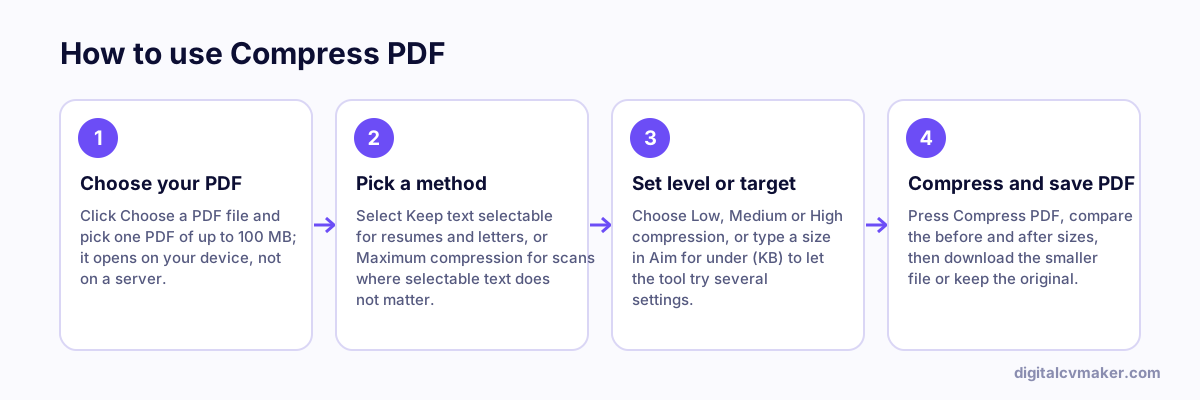
How to use Compress PDF: 1. Choose your PDF, 2. Pick a method, 3. Set level or target, 4. Compress and save PDF.
How to use the Compress PDF, step by step.

Why PDFs get too big to upload

Most oversized PDFs are made from phone photos or scans. A single camera photo can be several MB, so a five-page bundle of certificates easily crosses the 1 MB or 2 MB limit that job portals, college admission forms and government recruitment sites set. Text itself takes very little space — the pictures are what you need to shrink.

How to reach a size limit without ruining the document

  1. Remove pages you do not need first. A form asking for a mark sheet does not need the instructions page behind it.
  2. Try "Keep text selectable" at Medium. For a resume this matters: recruiters and ATS software need to read the text.
  3. If the file is a scan and still too big, switch to "Maximum compression" or type the limit in the "Aim for under" box.
  4. Open the result and zoom in. Marks, roll numbers and signatures must still be readable, or the upload may be rejected.

Keep the original file too — you may need a sharper copy for printing or for a portal with a higher limit.

Related tools

Worked example

A 1.8 MB resume for a 500 KB portal limit

What goes in

File: resume.pdf, 2 pages, 1.8 MB, with a large profile photo Portal limit stated on the form: 500 KB Aim for under: 500

What you get

Most of the size comes from the photo embedded at full camera resolution, not the text. With 500 in the Aim for under box, the tool first tries the text-keeping method: it shrinks the photo inside the PDF and leaves the text alone. That alone is usually enough for a resume, and the result says the target was reached with text still selectable, which matters because screening software must read it. Only if that fails does it turn pages into images, and it warns when that happens so you can decide.

Common mistakes

  • Choosing maximum compression for a resume, which turns pages into images so the text can no longer be selected, searched or read by screening software.
  • Compressing a PDF that is mostly text and expecting a big drop; text is already small, and photos or scans are where the size usually is.
  • Guessing the portal limit instead of reading the size stated on the form; limits vary widely between job portals and government forms.
  • Re-compressing an already compressed scan several times, which blurs the text without making the file much smaller.

When to use it: Use compress PDF when a form rejects your file for size; if the PDF holds pages nobody asked for, split them out first, which often saves more.

FAQ

Frequently asked questions

Pick the file, type the limit in the "Aim for under" box (for example 200) and press Compress. The tool first tries the text-keeping method, then turns pages into lighter images step by step until the file fits. It shows the size it reached, so you know before uploading whether it meets the limit.

Start with "Keep text selectable". It shrinks the photos inside the PDF and keeps text sharp, searchable and copyable, which ATS software needs for a resume. Use "Maximum compression" for scanned certificates or mark sheets where every page is already a picture and a much smaller file matters more than selectable text.

A PDF that is mostly text, or whose images are already compressed or stored in formats this tool leaves alone, has little left to squeeze. In that case the page tells you and offers the original file. Try "Maximum compression" if the document is a scan, or split out only the pages you need.

No. The PDF is read and rebuilt by your browser on this device, so offer letters, Aadhaar copies and salary slips are never sent to a server. It is free and works offline once the page has loaded. Password-protected PDFs need to be unlocked in a PDF reader first.

Your own website, live in minutes

Your headline, bio and contact card at your own link. 7-day free trial, no card needed.

Start free
Chat on WhatsApp