💧 Free tool · no signup

Free Watermark PDF

Stamp text such as "COPY" or "For verification only" across your PDF pages — pick size, angle, colour and opacity, free and without uploading the file. Stamping “For verification only” on ID or certificate copies shows the purpose they were shared for and discourages misuse elsewhere.

Up to 100 MB. Your file never leaves this device.

Pages

Good to know: a watermark is text on top of the page. It marks a copy and discourages misuse, but anyone with PDF editing software can remove it with some effort. It is not a security feature and does not lock or encrypt the file.

The watermark is added in your browser. No file is uploaded or stored.

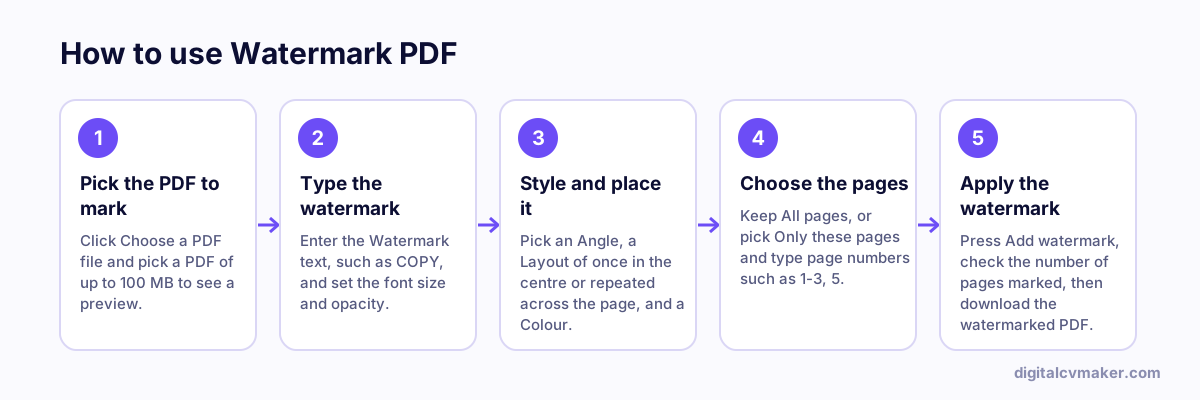
How to use Watermark PDF: 1. Pick the PDF to mark, 2. Type the watermark, 3. Style and place it, 4. Choose the pages, 5. Apply the watermark.
How to use the Watermark PDF, step by step.

Why watermark a document before sharing it

Copies of Aadhaar, PAN, passport pages, salary slips and offer letters get emailed and uploaded all the time — to a new employer's HR, a rental broker, a loan agent or a WhatsApp group for a society. A clear watermark shows who the copy was meant for, which makes it harder to reuse quietly for something else and easier to trace if it turns up where it should not.

How to write a useful watermark

  • Say who and why: "For HR verification only" or "Copy for flat rental agreement".
  • Keep it to a few words so it fits across the page at a readable size.
  • Use 20–35% opacity and a grey or blue colour, so your photo, name and ID number stay readable — an unreadable copy is usually rejected.
  • Choose "Repeated across the page" for ID copies, so the mark cannot simply be cropped off.

Keep the original, unmarked file for yourself, and share only the watermarked copy.

Related tools

Worked example

Marking an ID copy shared with a landlord

What goes in

File: Aadhaar copy PDF, 1 page Text: For rental agreement only, angle: 45° (rising) Opacity: 30%, layout: Repeated across the page

What you get

The text repeats diagonally across the page at 30% opacity, so the name and number underneath stay readable while every part of the copy is clearly marked. Naming the purpose shows what the copy was shared for and discourages anyone from reusing it for something else. The watermark is added in the browser, so the ID never leaves the device. It is a deterrent rather than a lock: someone with editing software could remove it with effort.

Common mistakes

  • Writing only “Copy” when stating the purpose and recipient, such as “For rental agreement only”, makes misuse elsewhere harder.
  • Setting opacity so high that the details underneath can no longer be read, which defeats the point of sharing the copy.
  • Treating a watermark as security; anyone with PDF editing software can remove it with some effort, so share sensitive documents sparingly anyway.

When to use it: Use watermark PDF when sharing an ID or certificate copy for one stated purpose; for confidential files, also limit who receives them in the first place.

FAQ

Frequently asked questions

A common practice is to state who the copy is for and why, for example "For KYC with the bank only" or "Submitted for job verification". Add the date if you like. Keep it short so it fits across the page, and leave the photo and number readable so the copy is still accepted.

Yes, with effort. The watermark is text placed on top of each page, and a person with PDF editing software can delete it or re-type the document. It discourages casual misuse and shows where a copy came from, but it is not protection — do not rely on it to secure sensitive information.

Not with this tool. It can draw English, most European languages and symbols such as ₹, $, £ and €, but not Devanagari, Arabic, Chinese or other such scripts — the page warns you if it finds them and leaves those letters out. Use an English or numeric watermark instead.

All pages by default. Choose "Only these pages" and type numbers such as 1, 3-5 to stamp just those pages — for example only the pages carrying your ID or salary details. The preview shows the first page that will be stamped.

Your own website, live in minutes

Your headline, bio and contact card at your own link. 7-day free trial, no card needed.

Start free
Chat on WhatsApp