🎨 Teachers & Education

Uptime website template

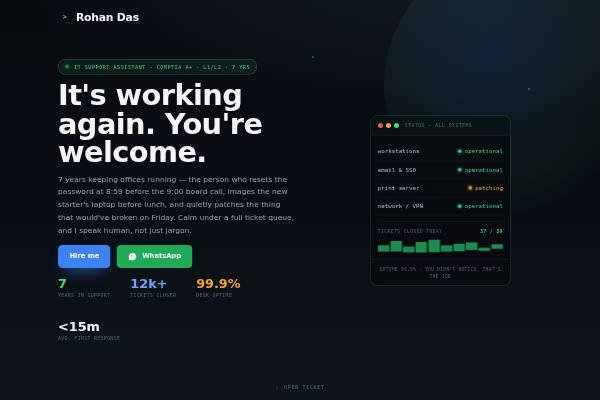
Clean status-board page for IT support & systems admins: live-monitor hero, about, the stack (skills), runbook (method), postings timeline, education & certifications, commendations, notes, testimonials, hiring brief and contact.

● Free to start · switch designs any time

Uptime personal website template for teachers, tutors — home page preview

About the Uptime design

Uptime is a clean status-board page for IT support and systems administrators. The hero is a near-black live monitor with blinking indicators, spark bars and a faint grid behind the line “It’s working again. You’re welcome.” The body switches to cool grey paper and white, with signal green, alert amber, wire blue and error red used as status colours. Sora sets headings, Inter the body and JetBrains Mono the labels. Sections cover what you support, a runbook method of fixing the issue then the cause, seven years on call, credentials, commendations, a knowledge base, testimonials and a hiring ticket.

Design highlights

  • A live-monitor hero with blinking indicators and spark bars on a dark grid.
  • The runbook method explains fixing the issue first, then removing the cause.
  • Signal green, amber and red are used as real status colours throughout.
  • A knowledge-base section holds short how-to articles you have written.

Who it suits

What’s included

Sections in the Uptime template

Plus your intro, photo and contact details. Switch any section off, fill the rest in minutes.

FAQ

About the Uptime template

Yes, that is its focus. List the systems you support, such as Windows, Microsoft 365, printers, Wi-Fi or a ticketing tool, and describe your process for handling tickets. Customer support executives in tech companies can use it too, with response and resolution times as stats.

Short write-ups of problems you solved: resetting a stuck print queue, setting up a VPN for remote staff, a checklist for new laptops. Three or four practical entries show how you think and communicate, which matters as much as technical skill in support roles.

Yes. Create a free account, pick Uptime and publish your site at your own link. Paid plans remove the small “Made with” badge and let you connect a custom domain.

Uptime comes with: Awards, Wiki / blog, Testimonials — plus your intro and contact details. Every optional section can be switched off, and you can reorder your content as you edit.

Yes. Your details are saved separately from the design, so switching templates keeps your content — only the look changes.

Yes. Pick your own accent colour and font in the editor; the layout adjusts automatically and stays readable on phones.

Make Uptime yours

Add your details and publish in about five minutes.

● Live in 5 minutes · free to start · no auto-renew

Chat on WhatsApp