🎨 Teachers & Education

Slate website template

Dark, professional two-column — sharp and confident.

● Free to start · switch designs any time

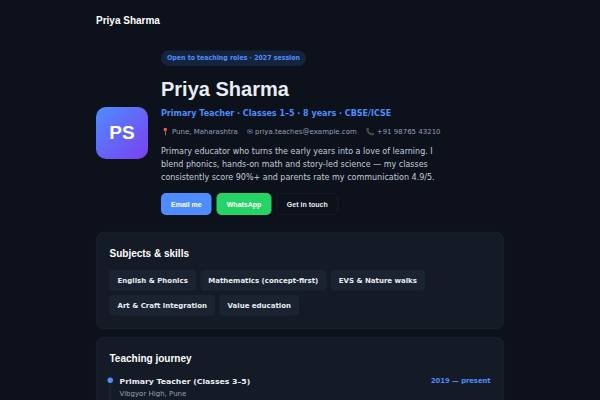
Slate personal website template for teachers, tutors — home page preview

About the Slate design

Slate is a dark, professional two-column design. The background is a deep blue-black, cards are a slightly lighter navy, text is soft white with muted grey details, and a clear sky-blue accent marks links and buttons. Sora sets confident headings and Inter the body. The hero places a square avatar on the left and your name, role, location and introduction on the right; on phones it stacks and centres. Below are skills, a career journey with dates on the right, education and certifications, testimonials and contact.

Design highlights

  • A two-column hero with avatar on the left and details on the right.
  • Deep blue-black cards with a sky-blue accent feel sharp in a dark interface.
  • Dates align to the right of each role, keeping long careers easy to scan.
  • Uses the same fields as Paper and Metro, so you can switch styles freely.

Who it suits

What’s included

Sections in the Slate template

Plus your intro, photo and contact details. Switch any section off, fill the rest in minutes.

FAQ

About the Slate template

For technical and consulting roles it usually works well; many reviewers already use dark mode, and the high-contrast text is comfortable to read. If you are applying to a conservative organisation, preview the light designs too. Your content moves between Slate, Paper and Metro without retyping.

Nocturne is a product-site look with glows, a grid background and gradient headings. Slate is plainer and more corporate: solid dark cards, one blue accent and a two-column hero. Choose Slate for consulting, analysis or infrastructure roles where a calm, serious look matters more than flair.

Yes. Create a free account, pick Slate and publish your site at your own link. Paid plans remove the small “Made with” badge and let you connect a custom domain.

Slate comes with: Subjects & skills, Experience, Education & certifications, Testimonials, Contact — plus your intro and contact details. Every optional section can be switched off, and you can reorder your content as you edit.

Yes. Your details are saved separately from the design, so switching templates keeps your content — only the look changes.

Yes. Pick your own accent colour and font in the editor; the layout adjusts automatically and stays readable on phones.

Make Slate yours

Add your details and publish in about five minutes.

● Live in 5 minutes · free to start · no auto-renew

Chat on WhatsApp