🗂️ Free tool · no signup

Free Biodata Maker for Jobs

Fill in a job biodata with personal, education and work details, see it live, and download it as PDF or Word — free, in your browser. A job biodata lists personal details such as date of birth, parents’ names, nationality and languages before education and work history.

A4 paper. Only the fields you fill in appear in the biodata.

Photo and name

Need a neat headshot first? Resume photo maker

Personal details
Educational qualifications

Start with the highest qualification, then go back to Class 10.

Work experience

Latest job first. Freshers can leave this empty or add internships.

Skills and hobbies
Declaration

Building preview…

Your biodata is built in your browser and the draft is saved only on this device. Nothing is uploaded.

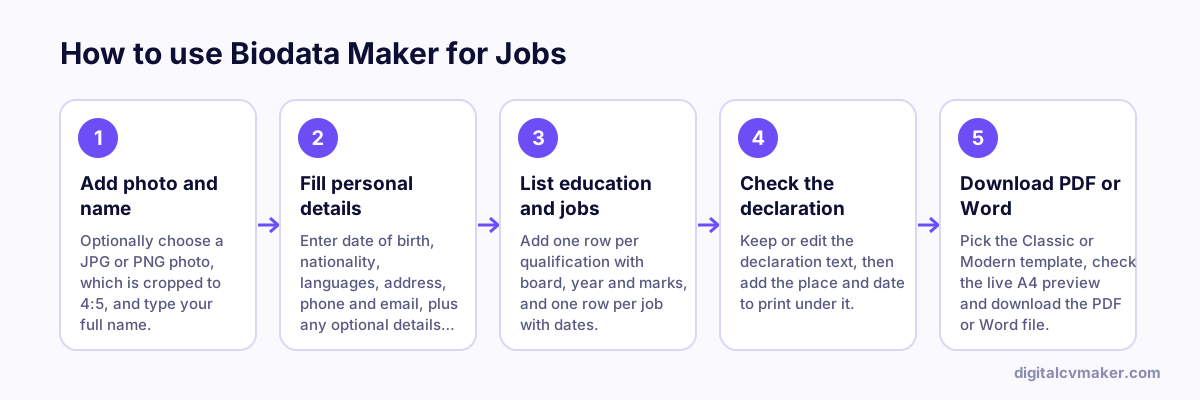
How to use Biodata Maker for Jobs: 1. Add photo and name, 2. Fill personal details, 3. List education and jobs, 4. Check the declaration, 5. Download PDF or Word.
How to use the Biodata Maker for Jobs, step by step.

Biodata or resume: which one to send

A biodata is a fact sheet about you: personal details first, then education and work history, closed with a signed declaration. Some government offices, public sector units, schools and colleges, and traditional private employers in India still ask for one. Most private companies, startups and recruiters expect a resume that leads with skills and results.

  • Use a biodata when the notice, form or employer asks for “biodata” by name.
  • Use a resume when the job post says resume or CV, or does not mention a format — build one with the free resume builder.
  • When in doubt, ask HR which format they prefer. It is a normal question and saves a second submission.

How to fill each section

  1. Name and photo: write your name exactly as it appears on your certificates. Use a recent, plain-background photo — the resume photo maker can crop one to 4:5.
  2. Personal details: fill only what the employer needs. Leave optional fields empty and they will not appear.
  3. Education: one row per qualification, highest first, with the board or university, year and marks or CGPA as printed on the marksheet.
  4. Work experience: organisation, designation and dates. Keep the dates consistent with your experience and relieving letters.
  5. Declaration: keep the standard line, add the place and date, and sign the printed copy above your name.

Before you submit it

  • Check spellings of names, dates of birth and marks against your documents. Mismatches cause delays during verification.
  • Send the PDF by email or upload, and bring a printed, signed copy to the interview if asked.
  • Applying to private companies too? Compare the layouts in the India resume format guide.

Worked example

A biodata for a factory supervisor post

What goes in

Personal: date of birth, father’s name, nationality, languages known Education: ITI Fitter, Class X Work: 6 years as machine operator, 2 as line supervisor

What you get

The maker lays out personal details first, as the employer’s format expects, then education and work history in date order, and closes with the declaration that the information is true, followed by place and date. The applicant leaves the optional mother’s name and marital status fields empty, so they do not appear on the PDF at all. The work section names the two roles with dates and one line each about the machines handled and the size of the shift supervised, which is what a plant HR team will look for first.

Common mistakes

  • Filling in every personal field out of habit, including details the employer has not asked for and that have nothing to do with the job.
  • Sending a biodata to a private company or overseas employer that expects a resume, where the personal-details-first layout looks out of date.
  • Forgetting to sign and date the declaration after printing, when the employer has asked for a signed copy.

When to use it: Use the biodata maker only when an employer specifically asks for a biodata; for most private-sector and overseas jobs, a resume from the resume builder is expected.

FAQ

Frequently asked questions

A resume focuses on skills, achievements and experience for one kind of role. A biodata puts personal details first, such as date of birth, parents’ names, nationality and languages, followed by education and work history. It is a fixed, factual format, while a resume is rewritten for each job you apply to.

Send a biodata when the employer, recruitment notice or application form asks for one by name. Some government offices, public sector units, schools and traditional private firms in India still request it. If the job post asks for a resume or CV, or does not say, send a resume instead.

This maker has no field for religion or caste, and the photo, gender, marital status and parents’ names are all optional. Add only what the employer or the recruitment notice asks for. If a form needs extra personal details, it usually has its own boxes for them, so you do not need to repeat them here.

Your draft is saved only in this browser on this device, so it is still there when you come back and you can keep editing it. Nothing is uploaded to us. Download the Word file if you want to edit it elsewhere, and use Clear to remove the draft from a shared computer.

Put your resume online as your own website

One link for applications, LinkedIn and WhatsApp. 7-day free trial, no card needed.

Start free
Chat on WhatsApp