🎯 Free tool · no signup

Tailor your resume to a job description

Paste a job description and tick the missing skills you really have: the tool adds them to your resume builder draft in one click, puts certification names under Certifications and drafts a summary line in the job’s own words. To only see your match percentage for a PDF or Word resume, use the resume job match.

Your resume *

Everything runs in your browser. The job description and your resume are not uploaded; your builder draft stays on this device.

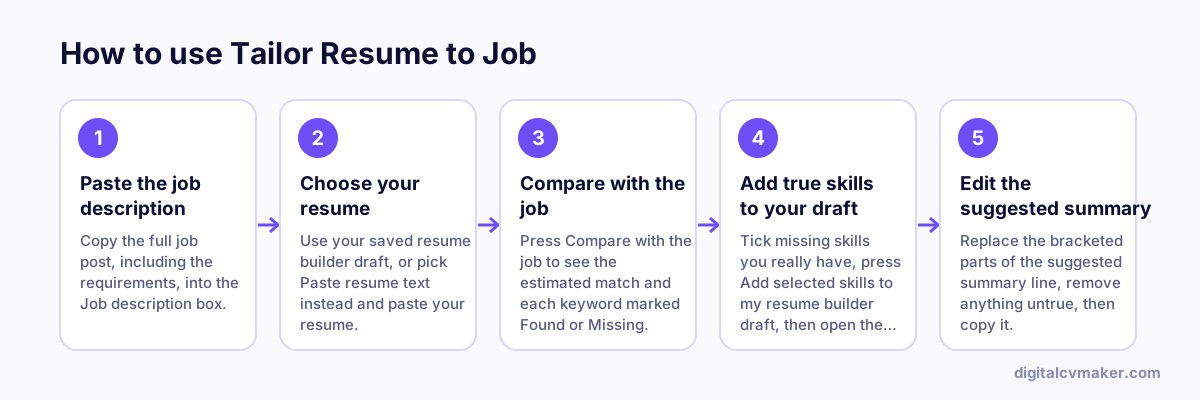
How to use Tailor Resume to Job: 1. Paste the job description, 2. Choose your resume, 3. Compare with the job, 4. Add true skills to your draft, 5. Edit the suggested summary.
How to use the Tailor Resume to Job, step by step.

How to tailor a resume to a job description

  1. Read the job post twice and note what it repeats: the job title, the tools, and the two or three duties it describes first. Those usually matter most to the person shortlisting.
  2. Mirror the exact job title in your headline or summary if it honestly describes you, for example “Senior Data Analyst” rather than a looser in-house title.
  3. Add tools and technologies you have used to your skills list, then prove the most important ones in a bullet with a result.
  4. Reorder your bullets so the ones closest to the job’s responsibilities come first under each role.
  5. Keep a master resume and save a tailored copy per application, so you always know what you sent.

Where each kind of keyword belongs

  • Tools, software and technical skills — skills list, plus one bullet showing where you used them.
  • Job title and seniority words — summary or headline, where a recruiter looks first.
  • Duties and responsibilities — experience bullets, written with an action verb and a number where true.
  • Certifications and licences — a certifications section with the issuing body and year or status.

Finish the resume in the free resume builder, check your match percentage for a PDF or Word resume with the resume job match, run a full resume check for length and structure, and send it with a matching cover letter.

Worked example

A marketing executive applying for a performance marketing role

What goes in

Job description: Google Ads, Meta Ads, GA4, ROAS, A/B testing, campaign budgets Resume: social media and content, mentions Meta Ads once Draft: resume builder draft on this device

What you get

GA4, Google Ads and ROAS rank near the top of the missing list because they appear in the title area and repeat in the requirements. The tool sorts them by where they belong: GA4 and Google Ads in the skills list, ROAS and A/B testing inside an experience bullet that shows real use. The candidate has run small A/B tests on email subject lines, so she ticks that one and writes a bullet about it, but leaves Google Ads unticked because she has never managed a budget there. Only ticked skills are appended to the draft.

Common mistakes

  • Ticking every missing keyword, including tools you have never used, which can get you shortlisted for an interview you cannot answer.
  • Adding keywords only to the skills list, when the same words placed inside an experience bullet also show where and how you used them.
  • Tailoring the master resume itself instead of saving a tailored copy, then sending the wrong version to the next, quite different job.

When to use it: Use this when you have a resume draft and one specific job to target; to only see your match percentage, use the resume job match.

FAQ

Frequently asked questions

No. It is an estimate from a simple rule-based comparison of the words in the job description and your resume. Every employer’s software and recruiter works differently, so use the score only to see whether tailoring is worth doing, and focus on the list of missing keywords.

Where it proves something. Tools and technologies belong in your skills list and in a bullet that shows how you used them. Job-title and seniority words fit your summary or headline, duties fit experience bullets, and certification names go in your certifications section with the issuing body.

No. Nothing changes until you tick keywords and press the add button. Ticked skills are appended to the skills list in your saved draft, duplicates are skipped, and ticked certification names go to certifications. You can edit or delete them in the builder.

For roles you really want, yes. Ten minutes spent echoing the job’s own wording in your summary, skills and top bullets usually makes the resume easier to search and quicker to read. Keep one master version and save a tailored copy for each job.

Put your resume online as your own website

One link for applications, LinkedIn and WhatsApp. 7-day free trial, no card needed.

Start free
Chat on WhatsApp