🗃️ Free tool · no signup

Free Job Application Tracker

Track every job application from wishlist to offer on one board, with follow-up reminders, saved on your device and exportable to Excel. The tracker sorts applications into five stages: Wishlist, Applied, Interviewing, Offer and Rejected or Closed, with arrow buttons and desktop drag-and-drop to move cards.

Your list is saved only in this browser on this device. Nothing is sent anywhere — export a backup to keep a copy.

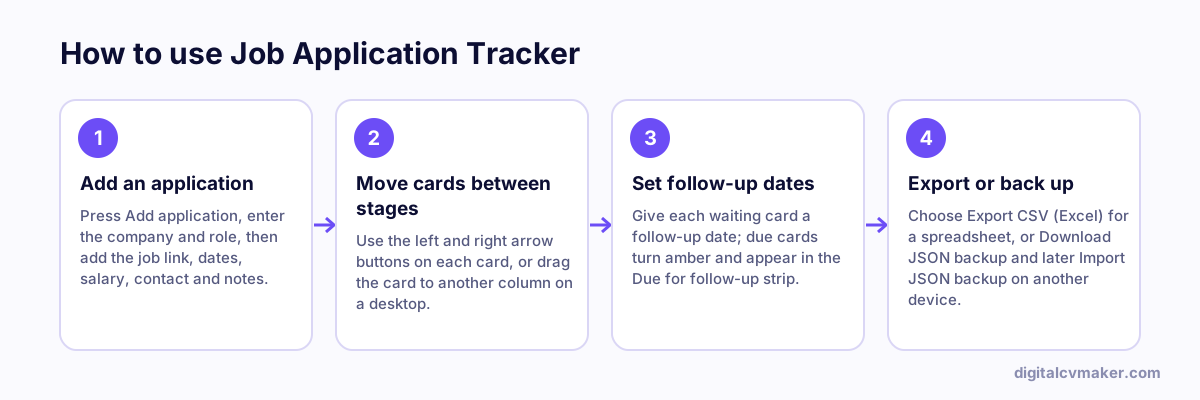
How to use Job Application Tracker: 1. Add an application, 2. Move cards between stages, 3. Set follow-up dates, 4. Export or back up.
How to use the Job Application Tracker, step by step.

How to use the board

  1. Add jobs you want to apply for to Wishlist, with the link to the job post so you can find it again after it closes on the job site.
  2. When you apply, move the card to Applied. The date applied is filled in for you if it is empty.
  3. Set a follow-up date on every card you are waiting on. Cards turn amber when that date arrives and are listed in the follow-up strip.
  4. Record the next step and the recruiter’s contact after every call, so nothing depends on memory.
  5. Move closed or rejected roles to the last column instead of deleting them; they still count toward your response rate.

Making a job search easier to manage

  • Tailor each application. A resume matched to the job post usually does better than many identical applications.
  • Write down the salary or CTC range discussed at each stage; it makes comparing offers and negotiating much simpler.
  • Review the board once a week. If many cards sit in Applied with no reply, change the resume before sending more.
  • Export a CSV at the end of your search to keep a record of where you applied and who you spoke to.

Build a clean resume with the free resume builder, match it to each job post with tailor resume to job, get ready for calls with the interview prep checklist, and send a polite nudge using the interview follow-up email generator.

Worked example

Two weeks of applications for a junior developer

What goes in

Wishlist: 3 companies; Applied: 12 Interviewing: 2; Rejected: 3 Follow-up date set on each Applied card

What you get

The response rate counts interviews and offers as a share of applications actually sent, so it is 2 out of 12, about 17%; the three Wishlist cards are left out because nothing has been submitted for them yet. Two cards past their follow-up date appear in the Due for follow-up list, so the candidate sends two polite follow-up emails. At the end of the week the CSV export opens in Excel with rupee signs intact, and a company name starting with a plus sign is kept as text instead of being treated as a formula.

Common mistakes

  • Logging applications in bulk at the end of the month, so dates are guessed and follow-up reminders arrive too late to be useful.
  • Moving a card to Rejected after a week of silence; many employers are simply slow, so set a follow-up date first.
  • Keeping the tracker only in one browser and clearing site data, which deletes the saved cards; export a CSV now and then as a backup.

When to use it: Use the tracker once you have more applications than you can remember; with only two or three, a note on your phone is probably enough.

FAQ

Frequently asked questions

Everything is saved in this browser on this device only. Nothing is uploaded, so there is no account and no one else can see your list. Clearing browser data or using a private window will remove it, so download a JSON backup now and then and import it on another device if you switch.

A common rule is about a week after applying, and a day or two after an interview if you have not heard back by the date they gave. Set a follow-up date on each card; when that date arrives the card is highlighted and appears in the reminder strip at the top.

Yes. Export CSV creates a file that opens directly in Excel, Google Sheets or LibreOffice with each application on its own row. Rupee signs and other characters display correctly, and cells that start with symbols are made safe so a spreadsheet will not treat them as formulas.

It is the share of applications you have sent that moved on to an interview or an offer. Wishlist cards are left out because you have not applied yet. A low rate after many applications usually means the resume needs tailoring to each job post rather than more applications.

Send one link with every application

A personal website with your resume, projects and contact details. Live in minutes.

Start free
Chat on WhatsApp