What does an applicant tracking system look for?
Many companies and job portals use an applicant tracking system (ATS) to store applications and help recruiters search them. Recruiters often filter by skills, tools, qualifications and job titles, so a resume that uses the same words as the advert is easier to find. This page uses a simple, rule-based keyword match; it is not the software any particular employer uses, and a high match does not guarantee a call.
How does the resume job match work?
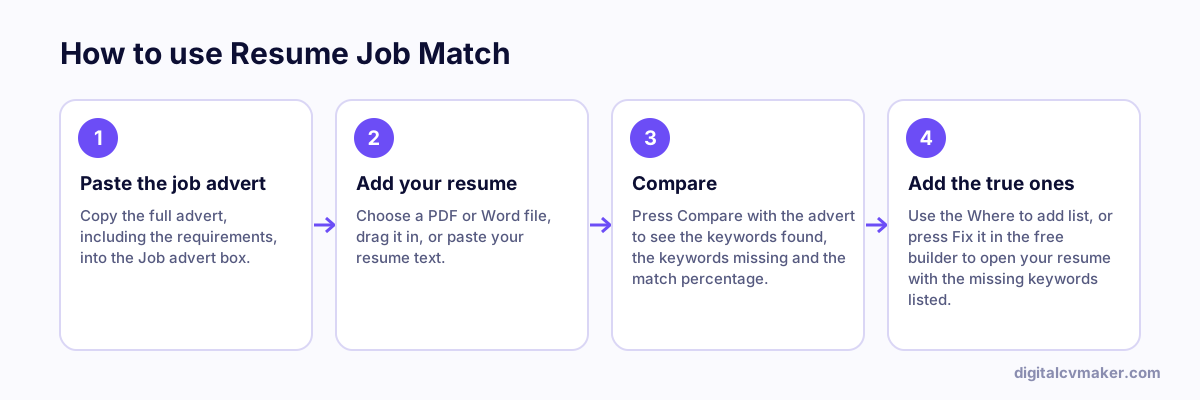
The tool reads the advert and picks out the words that usually decide a search: software and tools, technical skills, certifications, degrees and job titles. It then looks for each one in your resume and shows what it found, what is missing and the section where a missing keyword usually belongs.
- Tools and software — your skills list, plus one bullet that shows where you used it.
- Skills — a bullet under your most recent role, with a result where you have one.
- Job titles — your summary or headline, if the title is accurate for your work.
- Certifications and degrees — the Education or Certifications section, with the awarding body.
Years of experience the advert asks for are listed but never scored, because words can’t show them. Make your dates and job titles easy to find instead.
Want the missing skills added for you? Tailor your resume to the job adds the ones you tick to your resume builder draft and suggests a summary line in the advert’s words.
What should you do before you apply?
- Run the whole resume through the resume checker for length, layout, dates and personal details for the country.
- Press “Fix it in the free builder” to open your resume in the resume builder with the missing keywords listed, and add the true ones.
- Keep one master resume and save a tailored copy for each job you really want.