✅ Free tool · no signup

Free Resume Checker

Upload your resume as a PDF or Word file, pick the country you are applying to, and get a plain list of what passes and what to fix: contact details, length, sections, bullets, dates and layout. The file is read in your browser and is not uploaded.

or drag it here. Your file is read in this browser and is not uploaded.

No signup. Your file stays on your device; the checks are plain rules, not AI and not any employer’s software.

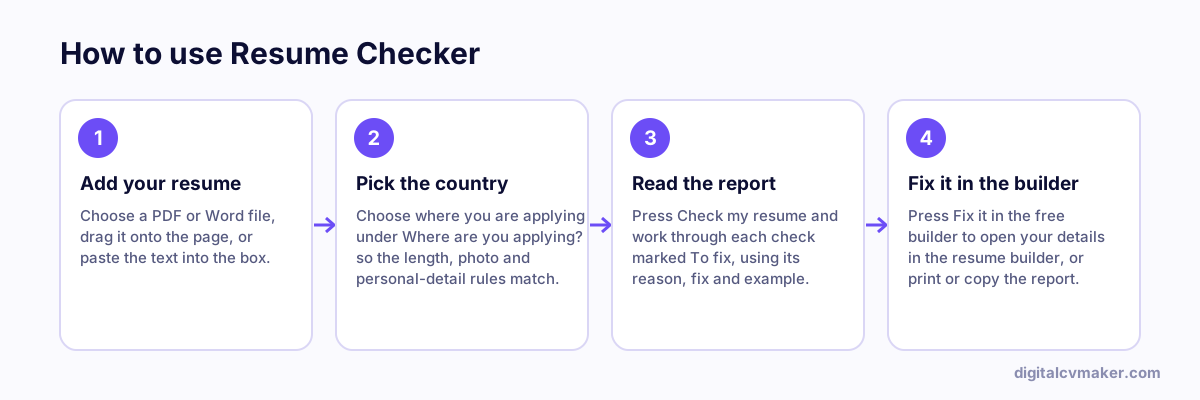
How to use Resume Checker: 1. Add your resume, 2. Pick the country, 3. Read the report, 4. Fix it in the builder.
How to use the Resume Checker, step by step.

What the resume checker looks at

Each check is a plain rule you can read and disagree with. The report lists the checks that need work first, each with one sentence on why it matters, how to fix it and an example, then the checks that passed.

  • Contact details — email, phone, city or location and a LinkedIn link near the top.
  • Length for the country — page count from your PDF or Word file (or an estimate from the word count) against the usual range in that country.
  • Sections — headings for summary, skills, experience and education.
  • Bullets — bullets that run too long, open with “Responsible for”, “Worked on” or “Helped”, or carry no number at all.
  • Wording — repeated words, “I” and “my”, common misspellings, self-praise without proof and British or American spelling for the country.
  • Dates — one date style throughout, such as “Jan YYYY – Mar YYYY”.
  • Layout and file — columns, tables, text boxes, contact details in the page header, a photo, and whether the file name includes your name.
  • Personal details — date of birth, marital status, religion, nationality, ID numbers and visa status, judged against what recruiters in the chosen country expect.

After the check

  1. Press “Fix it in the free builder” to open your details in the resume builder, fix the flagged lines and download a clean PDF or Word file.
  2. Compare it with the job you want in the resume job match tool, and add missing skills only where they are true for you.
  3. Applying abroad? Read the resume format by country guide for photo, length and personal-detail habits, then run the check again with that country selected.

Worked example

A sidebar CV checked for the UK

What goes in

Uploaded: CV-final(2).pdf, two pages, sidebar design with a photo Country: United Kingdom Personal block lists date of birth, marital status and nationality

What you get

Length passes at two pages, which sits in the usual UK range. Layout is flagged because the PDF looks like it has a sidebar, with the advice to use one column for large company portals. The photo check fails, since the UK guide says to leave the photo off except for acting or presenting roles. Personal details fail for date of birth and marital status, while nationality is listed as fine either way. The file name check suggests a name such as Rahul-Sharma-CV.pdf. Fix it in the free builder then opens the same details ready for a single-column design.

Common mistakes

  • Uploading a scanned PDF that holds only a picture of each page, so neither this checker nor most screening software finds any text to read.
  • Leaving the country set to India while applying in the UK or US, so the photo and date-of-birth rules in the report do not match the job.
  • Rushing to add numbers to every flagged bullet, including figures you cannot explain, when any of them may come up in the interview.

When to use it: Use the resume checker for a general health check before you apply anywhere; to compare your resume with one advert, use the resume job match instead.

FAQ

Frequently asked questions

No. The PDF or Word file is opened and read inside your browser, and the checks run there too. Nothing is sent to us unless you press “Fix it in the free builder”: then only the text, not the file, goes to our server once so the builder can be filled in, and it is not stored.

Because there is no single standard score that employers use. Each check here is a plain rule — contact details, length, sections, bullets, dates, layout, file name and personal details — and the report tells you which ones pass and why the others matter, so you can decide what to change.

Habits differ by country. A photo, nationality and visa status are common on CVs in the UAE and the Gulf, while US, UK, Canadian and Australian recruiters expect no photo, date of birth or marital status. Length habits differ too: Australia and the Gulf accept longer resumes than the US. The rules follow our resume format guides for each country.

Some older applicant tracking systems read a page line by line, so text in two columns, tables, text boxes or page headers can come out in the wrong order or go missing. A two-column design is fine to email or hand over, but for large company portals a single-column layout is the safer choice.

No tool can promise that. Passing means the basics are in place and the resume is easy to read; shortlisting still depends on your experience and how well it fits the job. To compare your resume with one advert, use the resume job match tool.

Put your resume online as your own website

One link for applications, LinkedIn and WhatsApp. 7-day free trial, no card needed.

Start free
Chat on WhatsApp