🧾 Free tool · no signup

Free Resume Builder

Fill in your details, pick from our resume designs and download a clean resume as PDF or Word — free, no signup, no watermark, built in your browser. Every template is a single column with standard headings and real, selectable text, the layout applicant tracking systems parse most reliably.

Design
Lagoon Centred Band
Colour

Cover letter in the same design

Who it is for

[Company] and [Role] in the letter are filled in from these fields in your download.

Letter

How do you want to start?

We read the text and fill the form below — files are not uploaded or stored. You check everything before you download.

Start from a sample (optional)

Samples are fictional people. Replace every line with your own details before you send it.

Your details

Summary

Need ideas? Objective generator · summary examples

Work experience
Education
Projects
Skills and languages
Certifications, achievements and more
References (optional)

Australian employers often expect two referees; elsewhere leave this empty and share references when asked.

PDF: free, no signup, no watermark. A free account adds Word, every design, photo resumes, a share link with QR code, and saving.

Keep a copy for each kind of job.

    Building preview…

    Want it online too?

    We fill a personal website with your name, summary, skills, experience, education and photo from this resume. Check each section, then publish.

    Your resume is built in your browser and saved only on this device. If you upload or paste a resume, only its text is sent to us to read it, and it is not stored. Nothing else is uploaded unless you choose to save it to your account, email yourself a link, “Save as online CV” or put it online.

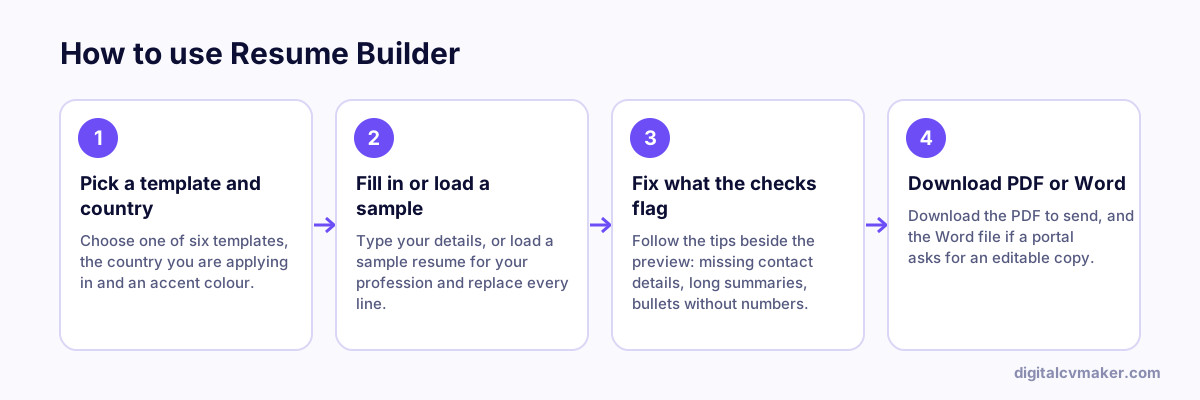
    How to use Resume Builder: 1. Pick a template and country, 2. Fill in or load a sample, 3. Fix what the checks flag, 4. Download PDF or Word.
    How to use the Resume Builder, step by step.

    How to write each section

    1. Summary: two to four lines with your role, years of experience, one strong proof point and the job you want next.
    2. Experience: newest job first. Start each bullet with a verb and add scale or a result — patients, clients, revenue, time saved.
    3. Skills: the tools and methods the job post asks for, in the same words, so both people and ATS software find them.
    4. Education, certifications and registrations: short and factual, with licence or registration numbers only where the field expects them.

    Match the country you are applying to

    Choosing a country sets the paper size and suggests whether to show a photo. Length, personal details and section names also change from market to market — see the resume format by country guide.

    Before you send it

    Run the text through the resume job match against the job description, check it with the resume checker, and write a matching letter with the cover letter generator. For ideas, browse full resume examples by profession.

    Worked example

    An accounts executive applying in India and the UAE

    What goes in

    Role: Accounts Executive, 4 years, Tally and GST returns Country: India, template: Classic Second copy: country switched to United Arab Emirates

    What you get

    The India copy prints on A4 with a single column and the standard headings Summary, Experience, Education and Skills, so screening software reads every line in order. For the UAE copy the paper stays A4, and because a photo is common on UAE applications, the applicant adds one before downloading. Both versions come out as PDF for portals and as Word for the recruiter who wants to edit. Because the draft is saved on the device, the second copy took a few minutes instead of a full rewrite.

    Common mistakes

    • Pasting a long paragraph into each job instead of three to five bullets, which hides the result a recruiter is looking for inside a wall of text.
    • Keeping a photo, date of birth and marital status on a resume meant for the US or UK, where recruiters expect these details left out.
    • Downloading only the Word file and uploading it to a portal, where fonts and spacing can shift; a PDF keeps the layout fixed.
    • Building the resume on a shared or office computer and forgetting that the draft stays saved in that browser until it is cleared.

    When to use it: Use the resume builder when you need a complete resume file today; if you already have one, the resume checker is the quicker way to improve it.

    FAQ

    Frequently asked questions

    Yes. You can build as many resumes as you like and download each one as a PDF or Word file without signing up or paying. There is no watermark: a small “made with” line is added only if you tick it. Paid plans add an online CV link and a personal website.

    Every design uses standard headings and real text (not an image). Single-column designs are the safest choice for large company portals; two-column designs look great, but some older applicant tracking systems read two columns out of order. Download the PDF unless the job portal asks for a Word file.

    No. The resume is built inside your browser and the draft is saved only on this device, so it is still there when you come back. Download a backup file to move it to another device. Nothing is sent to us unless you choose to save it as an online CV.

    Pick a single-column, ATS-friendly design for job portals and large companies. Compact one-page designs help freshers; designs with a photo suit UAE and Gulf applications, which also add nationality, visa and notice period. Academic designs put education and publications first. You can switch design any time without losing your text.

    Turn this resume into your own website

    Same details, live at your own link — share it in job applications, on LinkedIn and WhatsApp. 7-day free trial, no card needed.

    Start free
    Chat on WhatsApp