🪄 Free tool · no signup

Free Resume to Website Preview

Paste the text of your resume and see it as a personal website — instantly, in your browser, with nothing uploaded. A personal website works like a resume that opens on any phone, stays current after you share it and can show projects and photos.

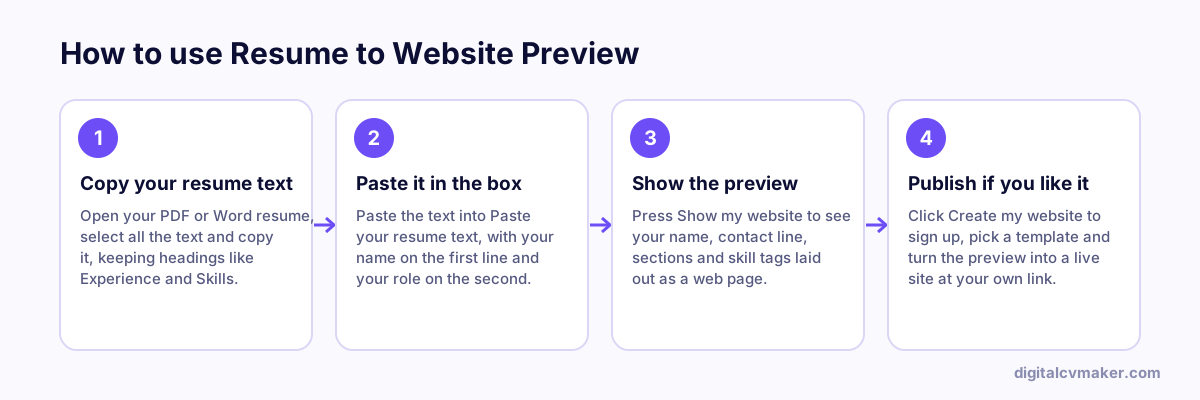
How to use Resume to Website Preview: 1. Copy your resume text, 2. Paste it in the box, 3. Show the preview, 4. Publish if you like it.
How to use the Resume to Website Preview, step by step.

Worked example

A graphic designer’s resume as a web page

What goes in

Pasted text: name, contact line, Summary, Experience, Skills, Education Skills line: Figma, Illustrator, brand identity, packaging Experience: two studios and freelance work

What you get

Because the pasted text has clear headings, the preview sorts it into sections: a header with name and role, an about block from the Summary, a timeline from Experience and a skills list. The designer sees at once that her resume does not mention a single project by name, which matters far more on a website than on paper. She notes three projects to add with images once she builds the real site. Nothing is uploaded, so the preview disappears when the tab closes.

Common mistakes

  • Pasting text copied from a two-column PDF, where lines from both columns are mixed together and the sections cannot be recognised.
  • Using creative headings like “My journey” instead of Experience, so the preview cannot tell which part of the text is which.
  • Treating the preview as the finished site; it is a quick look, and a real website needs an account and a template to go live.

When to use it: Use this to see quickly how your resume would read as a website before signing up; if you already know you want one, start with a template directly.

FAQ

Frequently asked questions

No. The preview is built in your browser from the text you paste. Nothing is sent to our servers or saved — close the tab and it is gone.

Open the file, select all the text (Ctrl+A or Cmd+A), copy it and paste it here. Headings such as Experience, Education and Skills help the preview sort your details.

Create a free account, pick a template and paste the same details into the editor. Your site goes live at your own link in about five minutes, and you can update it any time.

A website is a link that opens on any phone, stays up to date after you send it, and can show projects, photos and a contact form. It can also appear when someone searches your name.

Make this preview your real website

Pick a design, add your details and go live at your own link in minutes. 7-day free trial, no card needed.

Start free
Chat on WhatsApp