✍️ Free tool · no signup

Free Resume Headline Generator

Tell us your role, experience and top skills — get ten recruiter-ready headlines for your resume, LinkedIn, Indeed or Naukri profile. Free, no signup. A resume headline is one line under your name that states your role, level and strongest skills, usually in about 10 to 20 words.

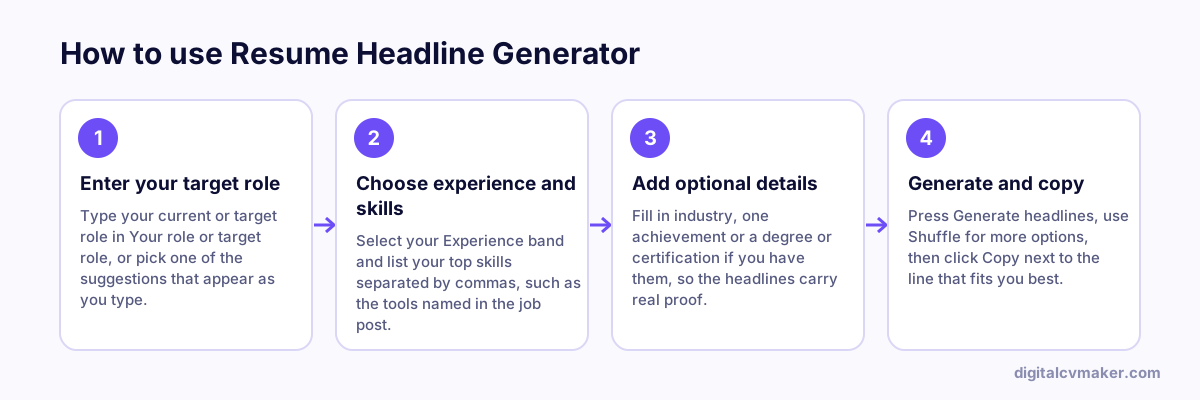
How to use Resume Headline Generator: 1. Enter your target role, 2. Choose experience and skills, 3. Add optional details, 4. Generate and copy.
How to use the Resume Headline Generator, step by step.

How to use your headline

Pick the headline that sounds most like you, then adjust a word or two so it matches the job you are applying for. Put it directly under your name on your resume, paste it into the headline field of your job-portal profile and use the same line at the top of your personal website so every place you appear tells one consistent story.

What makes a strong resume headline

  • Role first. Recruiters search by job title, so start with the title you want to be found for.
  • Level and scope. “5+ years” or “team lead” tells a reader instantly where you fit.
  • Two or three real skills. Name tools or specialisms that appear in the job description — not soft skills everyone claims.
  • Proof, if you have it. A measurable result makes a headline memorable. Only use numbers you can back up in an interview.

Want more examples? Read our guide to writing a professional bio or turn your resume into a shareable online resume.

Worked example

A headline for a mid-level civil engineer

What goes in

Role: Site Engineer (Civil) Experience: 5 years Skills: AutoCAD, quantity estimation, high-rise residential projects

What you get

The generator returns ten options that all start with the job title, such as “Site Engineer (Civil) with 5 years in high-rise residential projects, AutoCAD and quantity estimation”. Starting with the title matters because recruiters on job portals often search by role first. The engineer picks the option that names residential projects, since the jobs he wants are with housing developers, and pastes it as the Naukri resume headline and as the line under his name on the resume. Shuffle gives a fresh set if none of the ten fit.

Common mistakes

  • Opening with an adjective like “Motivated professional” instead of the exact job title, which wastes the words recruiters scan and search first.
  • Using a headline for a role different from the jobs you are applying for, so searches for your target role never find your profile.
  • Stuffing in eight or nine skills; two or three of the most relevant ones read better and still fit in a single line.

When to use it: Use the headline generator for the one line under your name on a resume or job portal; for a full paragraph about yourself, use the bio or LinkedIn About generator.

FAQ

Frequently asked questions

It is the one-line summary at the top of your resume or job-portal profile, right under your name. Recruiters read it first, so it should say what you do, your level and the value you bring in about 10 to 20 words.

Keep it to one line — roughly 60 to 150 characters. Job portals allow longer headlines, but recruiters skim, so lead with your role and strongest skill and cut anything generic like “hard-working professional”.

Yes. A fresher headline should name the role you want, your degree or specialisation and one or two relevant skills or projects. It shows intent and helps your profile match recruiter searches.

Tweak it when the role changes meaningfully — for example swap the skills you lead with to match the job description. Your core role and level can stay the same.

Use your headline on your own site

Put it at the top of a personal website and link to it from your resume and LinkedIn. Live in minutes.

Start free
Chat on WhatsApp