⏰ Free tool · no signup

Free Interview Day Planner

Enter your interview time, mode and travel time to get a calm timeline for the day, a checklist and a calendar file with reminders. For an in-person interview the planner works backwards: arrive by is start time minus buffer, leave by subtracts travel time, and wake-up subtracts time to get ready.

Made in your browser. Nothing you enter is sent anywhere or saved.

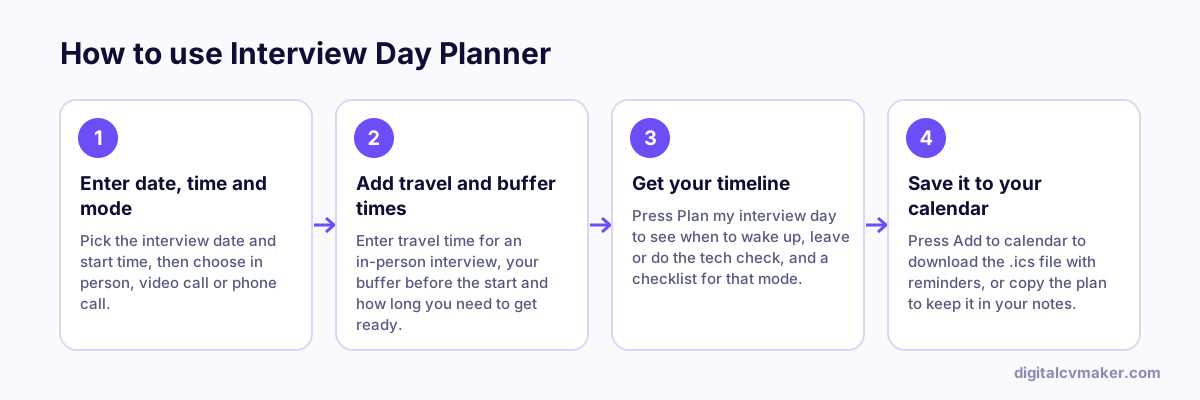
How to use Interview Day Planner: 1. Enter date, time and mode, 2. Add travel and buffer times, 3. Get your timeline, 4. Save it to your calendar.
How to use the Interview Day Planner, step by step.

How the timeline is worked out

  • In person: arrive by = start time minus your buffer; leave by = arrive by minus travel time; wake up = leave by minus the time you need to get ready.
  • Video: join by = start time minus your buffer; the tech check is 20 minutes before that, and getting ready starts before the tech check.
  • Phone: be seated with your notes at start time minus your buffer, and check your charge and signal 20 minutes before that.

Add extra travel time for peak-hour traffic, rain, parking or a long security queue. If you have never been to the building, do a trial run or check the route at the same time of day.

The evening before

  • Lay out clothes, documents and your bag so the morning is calm.
  • Re-read the job description and your resume, and pick three stories you want to tell.
  • Charge every device and set two alarms.

Make a full prep plan with the interview prep checklist, rehearse answers aloud with interview question practice, check how ready you are with the readiness check and send a thank-you note afterwards with the follow-up email generator.

Worked example

An in-person interview across the city

What goes in

Interview: 11:00 AM, in person Travel time: 60 minutes Buffer: 20 minutes

What you get

Working back from 11:00, the plan says to arrive by 10:40 and leave home by 9:40, with a wake-up time and a checklist of documents before that. The calendar file adds the interview with reminders the day before, at the leave-by time and at the buffer, so a phone alarm does the remembering. For a video interview the same tool swaps travel for a tech check fifteen minutes before joining.

Common mistakes

  • Planning to arrive exactly on time, which leaves no room for traffic, security checks or finding the right floor.
  • Skipping the tech check for a video interview and discovering a camera or microphone problem when the panel joins.
  • Keeping the plan in your head instead of adding it to the calendar, so reminders do not go off on a busy morning.

When to use it: Use it the day before any interview to fix when to leave or log in, and add reminders so nothing on the day depends on memory.

FAQ

Frequently asked questions

Plan to reach the building 15 to 20 minutes early, then walk into reception about 10 minutes before your slot. That leaves time for security checks, a visitor badge and finding the right floor. Arriving much earlier can put pressure on the interviewer, so wait nearby if you are very early.

Do a full tech check about 30 minutes before: open the meeting link, test your camera, microphone and internet, and close other apps. Join five to ten minutes early so you are in the waiting room when the interviewer opens the call. Keep the phone number from the invite handy in case the link fails.

It is a standard .ics file that Google Calendar, Outlook and Apple Calendar can open. It adds the interview as an event with your timeline in the notes and reminders the day before, at your leave-by or tech-check time and shortly before the start. Some calendar apps keep only the first reminder.

No. The timeline, checklist and calendar file are made in your browser from what you type. Nothing is sent to our servers, and the calendar file is saved straight to your device. You can leave the company and location fields empty if you prefer.

Recruiters Google you before the interview

Get a page that shows up: your experience, projects and contact details at your own link. Live in minutes.

Start free
Chat on WhatsApp