💼 Free tool · no signup

Free LinkedIn About Generator

Answer six questions and get a first-person LinkedIn About section in a short and a full version — ready to paste and polish. LinkedIn allows up to 2,600 characters in the About section, but around 120 to 250 words is usually enough to be read in full.

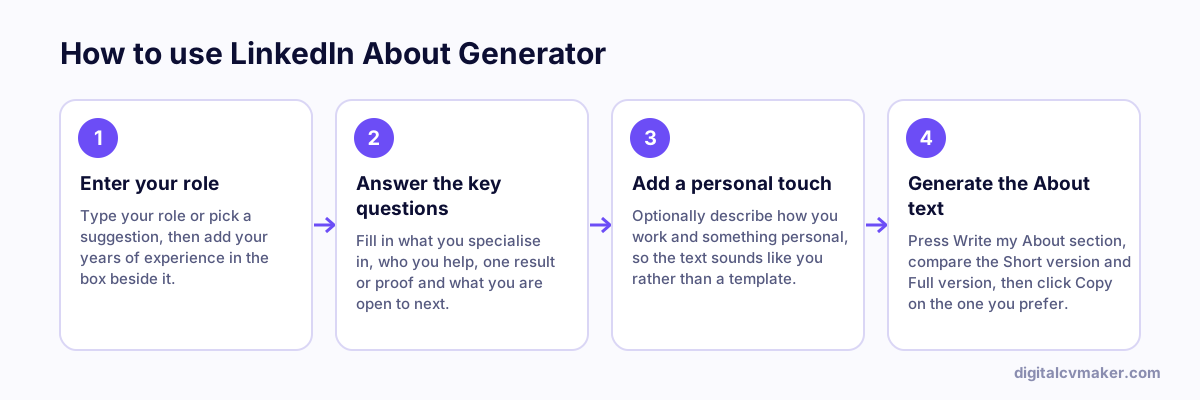
How to use LinkedIn About Generator: 1. Enter your role, 2. Answer the key questions, 3. Add a personal touch, 4. Generate the About text.
How to use the LinkedIn About Generator, step by step.

Make it yours

Treat the result as a first draft. Replace any generic phrase with the words you would use with a colleague, add one detail only you could write, and read it aloud. Recruiters and clients remember specifics — a project, a number, a place — far more than adjectives.

Need ideas for your field? See LinkedIn headline and About examples by profession, or write a matching resume headline.

Worked example

An About section for an HR generalist moving into talent acquisition

What goes in

Current role: HR Generalist, 4 years in manufacturing Wants: talent acquisition roles Proof: hired for 3 plant locations, cut time-to-hire by setting up an interview panel rota

What you get

The tool writes a short and a full About section in the first person. Both open with who she is and the move she wants, because only the first two or three lines show before “see more”. The full version then covers the hiring she already does, the panel rota and what she is looking for next, in about 200 words, well inside LinkedIn’s 2,600-character limit. The short version suits profiles that will mostly be skimmed. She edits one sentence to name the plant roles she hired for, which makes it specific to her.

Common mistakes

  • Opening with a long story about your childhood or first job, so the preview before “see more” says nothing about what you do now.
  • Writing in the third person on your own LinkedIn profile, which reads as if someone else wrote it for you.
  • Pasting your resume bullets as the About section; it should explain what you do and why, while the Experience section holds the details.

When to use it: Use the About generator for the summary on your LinkedIn profile; for a speaker intro or website bio in several lengths, the bio generator is the better choice.

FAQ

Frequently asked questions

LinkedIn allows 2,600 characters, but 120 to 250 words is plenty. Only the first two or three lines show before “see more”, so put who you are and who you help right at the start.

Yes. First person (“I help…”) reads naturally on LinkedIn and makes it clear you wrote it. Save third person for speaker introductions and company pages.

A simple next step: what you are open to — roles, projects, speaking, collaborations — and how to reach you, such as a message on LinkedIn or a link to your website.

No. The text is written in your browser from what you type; nothing is sent to our servers or saved.

Use it on your own site too

Your About section works as the intro of a personal website people can find on Google. Live in minutes.

Start free
Chat on WhatsApp